Tools that every manager should use
In this blog, I will talk about the tools that every manager should build expertise.
Managers should use tools that supports to do day-to-day work with ease.
Many organisation reserve good amount of money to purchase tools that helps for better collaboration, information management across all business units within the organisation.
The effective usage of management tools will help in bringing transparency about the progress and centralising the information that would be needed for the team.
In this blog, I will talk about categories of the tools that every manager should adopt and learn to use it effectively.
Tools
Below are the categories of tools that you will end up using.
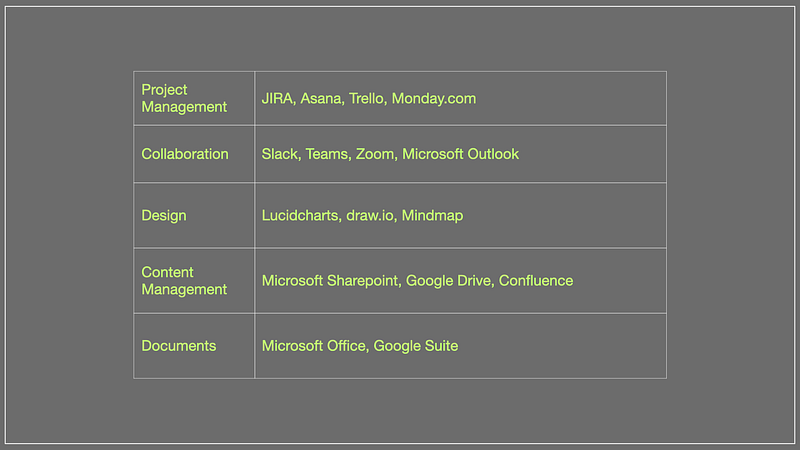
For each category, I have provided few tool names. But you are free to choose similar tools that are available.
Let’s look at each category in bit more details and how it helps managers.
▸ Category#1 : Project Management tool
The project management tool helps in managing all the tasks related to several projects at a central location.
These tools will help you to run the project is various execution model. Now-a-days, the two popular execution models are Scrum and Kanban. So most of the tools inherently support these two execution models.
The project management tool helps in allocating resources, planning future work and tracking the bandwidth utilisation for every resource.
The project management tool also helps in tracking the progress of the project in the form of milestones and releases.
So effective usage of project management tools will help you to allocate, plan and track any project without any hassle.
Examples: JIRA, Asana, Trello, Monday.com.
▸ Category#2 : Collaboration tool
The collaboration tools helps to connect with the team members easily without needing in-person meetings.
Since remote work has become a norm, these collaboration tools helps to manage the remote team efficiently.
The current collaboration tools have things like note taking, creating to-do list, setting up reminders for getting updates and many more. These features help to exchange information between team members and a manager.
Some of the collaboration tools can also have members who are external to the organisation. So, if there is no meeting slot available, collaboration tools can help to exchange the information.
So, learning all the features of the collaboration tool will help in managing the remote teams effectively.
Example: Slack, Teams, Zoom, Microsoft Outlook
▸ Category#3 : Design tool
The design tools will help to you design, architect any module or exchange ideas while designing a module.
The design tool are one of the most ignored tools by many managers. The usage of design tool is so limited that the design discussion occurs without much visuals which creates lot of confusion and in-turn lot of time is taken to make a decision.
The collaboration tool provides easy way to structure the design aspects, scope, relationships between different modules within the application, relationship between the scope items, breaking down scope into functional blocks, visualise workflows, users flows etc.
Now-a-days all collaboration tools are online. Hence sharing information and co-designing has become so easy. So highly recommending to utilise design tools as a manager for better exchange of information related to design and architecture.
Example: Lucidcharts, draw.io, Mindmap
▸ Category#4 : Content management tool
The content management tool helps you to centralise the information for any of the projects.
These content management tool can help you to create and store documents, slide decks, training materials online. The online documents can be shared with all the stakeholders without much hassle.
These tools remove the need to share documents in email and loosing it.
Example: Microsoft Sharepoint, Google drive, Confluence
▸ Category#5 : Document tool
These tools are used to create document information in a structured way locally and then uploading to the content management.
These tools helps to create offline documents for self use, or to create confidential documents, slide decks as the need arise.
Use these tools for documenting your thoughts, creating training materials, capturing 1on1 notes, structuring information while talking to team members etc.
Example: Microsoft’s Word, Excel, PowerPoint), Google’s Doc, Sheet, Slides.
Final Thoughts
The tools helps manager to better structure the information. The tools help you to manage, track activities in a team.
As managers, it is important to learn to use the tools effectively. It is like learning how to use an IDE with all the shortcut keys.
Learn to use the tools effectively for supporting your trainings, onboarding, design of modules, centralising information to support your team’s day-to-day operations.
Happy management!